How to Deploy Caddy 2.3 with Automatic HTTPS in Docker Swarm
Caddy is a powerful, enterprise-ready, open-source web server with automatic HTTPS written in Go. Learn how to deploy it as an ingress reverse proxy in Docker Swarm.
Caddy is an enterprise-ready, open-source web server written in Go that manages HTTPS automatically by default.
In this guide, we will deploy Caddy 2.3 inside a Docker Swarm cluster using Docker Compose to act as an ingress reverse proxy, TLS terminator, and load balancer for containerized microservices.
Prerequisites
Ensure you have the following infrastructure ready before proceeding:
- A functional Docker Swarm Cluster with distributed shared storage (such as GlusterFS).
- Administrative access to the Docker Swarm manager node.
- A registered domain with DNS records pointed to your cluster ingress IP.
Introduction to Caddy
Caddy is an open-source web server written in Go. It relies on the Go standard library for its core HTTP implementations and provides native, zero-configuration TLS management.
Originally developed by Matthew Holt in 2014 and released in 2015, Caddy is maintained by an active open-source community. You can explore the project on the official Caddy GitHub repository.
Caddy significantly reduces infrastructure complexity. It handles ACME certificate issuance, automated renewals, OCSP stapling, static asset delivery, HTTP reverse proxying, and ingress routing from a single static binary.
Caddy runs efficiently in containers because it has no external runtime dependencies—not even
libc.

Security Architecture
Caddy provides modern, hardened security primitives out of the box:
- Automated TLS Lifecycle: Acquires and renews Let’s Encrypt or ZeroSSL certificates automatically, with proactive OCSP response stapling.
- Memory Safety: Written in Go, mitigating widespread memory corruption vulnerabilities common in C-based servers.
- Modern Cipher Suites: Defaults to secure protocols (TLS 1.2 and TLS 1.3) with strong cipher suites like ECDHE-ECDSA with AES-256-GCM.
- Protocol Downgrade Mitigation: Implements
TLS_FALLBACK_SCSVto protect against protocol downgrade exploits.
Core Capabilities
- Native support for HTTP/1.1, HTTP/2, and HTTP/3.
- Automatic HTTPS provisioning via ACME without external cron jobs or certbot scripts.
- High-performance static file serving.
- Flexible reverse proxying with dynamic load balancing, active health checks, and WebSocket support.
- FastCGI proxy integration for PHP-based workloads.
- Gzip and Zstandard compression.
- Declarative configuration via the human-readable Caddyfile or programmatically via its dynamic JSON API on port
2019.
Persisting Caddy State with GlusterFS
Docker Swarm tasks are inherently ephemeral. If a container restarts or migrates to another node after a host failure, local container filesystem modifications are lost.
To ensure stateful continuity, we use GlusterFS as a distributed, replicated network filesystem mounted across all Swarm worker and manager nodes:
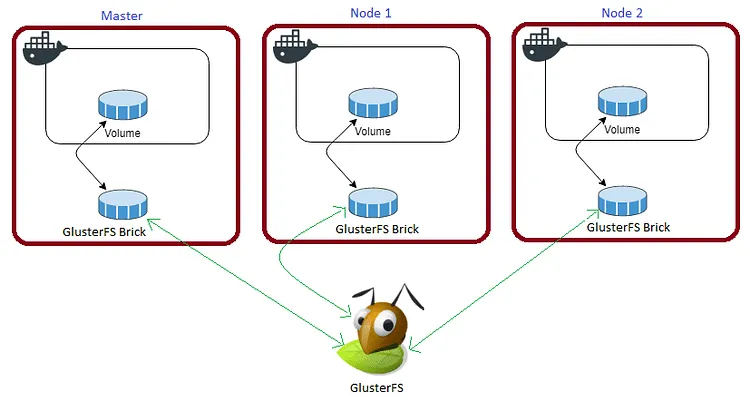
When a file is written to the shared mount point, it is replicated across the cluster. If a node fails, the service restarts on another node with zero data loss.
For Caddy, we must persist three directories:
/data: Holds acquired ACME certificates, private keys, and account metadata./config: Stores the running configuration state and autosaves./var/log/caddy: Retains access and error logs for auditing.
Create the persistent directories on your shared storage mount:
cd /mnt
sudo mkdir -p caddydata caddyconfig caddylogs
Review the setup guide and architecture video below for configuring replicated GlusterFS volumes on Ubuntu.
Prepare the Swarm Environment
First, create a Docker overlay network. This network acts as the communication plane connecting Caddy to backend application services.
Run the following commands on your Swarm manager node:
docker network create -d overlay --attachable caddyNext, create a dedicated project directory:
cd /opt
sudo mkdir -p caddy
cd caddy
sudo touch Caddyfile caddy.yml
Caddyfile Configuration
Open Caddyfile using your text editor:
sudo nano CaddyfilePaste your site blocks or template configuration. Here is a baseline configuration serving static files with template rendering:
localhost {
    templates
    file_server
}
Docker Compose Stack Definition
Open caddy.yml:
sudo nano caddy.ymlAdd the following stack specification:
version: "3.7"

services:
  caddy:
    image: tuneitme/caddy:latest
    ports:
      - "80:80"
      - "443:443"
    networks:
      - caddy
    volumes:
      - ./Caddyfile:/etc/caddy/Caddyfile
      - /mnt/caddydata:/data
      - /mnt/caddyconfig:/config
      - /mnt/caddylogs:/var/log/caddy
      - /mnt/blog:/etc/caddy/html/blog
    environment:
      - ACME_AGREE=true
    deploy:
      replicas: 1
      placement:
        constraints:
          - node.role == manager
      update_config:
        parallelism: 2
        delay: 10s
      restart_policy:
        condition: on-failure

volumes:
  caddydata:
    driver: "local"
  caddyconfig:
    driver: "local"
  caddylogs:
    driver: "local"
  blog:
    driver: "local"

networks:
  caddy:
    external: true
Watch the deployment walkthrough below for detailed instructions on managing Caddy in Docker Swarm.
Deploy Caddy to the Swarm
Deploy the stack using the Docker CLI:
docker stack deploy --compose-file caddy.yml caddyVerify that the Caddy service task is active and running on the manager node:
docker stack ps caddyInspect the service logs to verify TLS certificate issuance and initialization:
docker service logs -f caddy_caddySummary
Caddy delivers an automated, self-healing TLS edge router with minimal configuration overhead. In upcoming tutorials, we will connect downstream applications—including Ghost, Nextcloud, and MariaDB—directly to this caddy overlay network for automatic routing and encryption.

Continue reading

How to Deploy Traefik 2.10.1: Cloud Native Edge Router for Containers in Docker Swarm
Traefik is a cloud-native reverse proxy and load balancer that automatically discovers the right configuration for your microservices, making deployments seamless.

How to Deploy Authelia Using Docker Compose Behind Caddy
Authelia is an open-source authentication and authorization server providing two-factor authentication and single sign-on (SSO) for applications via a web portal.

How to Self-Host Stalwart Mail Server Using Docker Compose Behind Caddy v2.8.4
Stalwart is an open-source mail server solution with JMAP, IMAP4, POP3 & SMTP support. It is written in Rust and aims to be secure, fast, robust, and scalable.