How to Deploy Authelia Using Docker Compose Behind Caddy
Authelia is an open-source authentication and authorization server providing two-factor authentication and single sign-on (SSO) for applications via a web portal.

Authelia is an open-source authentication and authorization server providing two-factor authentication and single sign-on (SSO) for your applications via a web portal. It acts as a companion for reverse proxies by allowing, denying, or redirecting incoming HTTP requests.
Happy New Year 2025 to all readers! Wishing you a year of health, wealth, and endless opportunities.
I have been a bit busy with other work, so I haven’t had much time to write articles. Moving forward, I will publish tutorials more regularly.
Let’s get started. Today, I will walk you through deploying Authelia using Docker Compose behind a Caddy reverse proxy.
Prerequisites
Ensure you fulfill the following requirements before proceeding with the deployment:
- Ubuntu Server (any Linux distribution works, but Ubuntu is used throughout this guide).
- Docker and Docker Compose installed on your server.
Introduction to Authelia
Authelia is an open-source authentication and authorization server and portal fulfilling the Identity and Access Management (IAM) role. It provides multi-factor authentication and single sign-on (SSO) for your applications via a web portal, serving as an authentication companion for reverse proxies such as Caddy, Traefik, and NGINX.
Here, we integrate Authelia with Caddy. Authelia handles requests directed to its authorization (authz) endpoints using specific headers and returns standardized responses based on your configured policies.
Caddy leverages its forward_auth directive to pass client requests to Authelia based on the proxy authorization endpoint, response headers, and session cookies.
The Single Sign-On Multi-Factor Portal for Web Apps.
Authelia Server Core Features
Lightweight
- Compressed container image size is under 20 MB.
- Runtime memory usage typically stays below 30 MB.
Fast
- Authorization policies and backend validations execute in milliseconds.
- The web login portal loads in under 100 milliseconds.
Login Regulation
- Prevents brute-force attempts by enforcing temporary lockouts after consecutive failed logins.
Password Reset
- Enables self-service password resets for LDAP or file-based accounts using email verification.
Single Sign-On (SSO)
- Allows users to authenticate once across multiple web applications via session cookies, OpenID Connect, and trusted headers.
Authorization Policies
- Defines granular access control rules mapping specific users and groups to domain endpoints.
Multi-Factor Authentication
- Supports one-time passcodes (TOTP), push notifications (Duo), and hardware security keys (WebAuthn / FIDO2).
Intuitive User Interface
- Clean, responsive portal providing an effortless login experience for end-users.
Prepare the Authelia Server Environment
Create a dedicated directory under /opt on your host to persist Authelia’s configuration and runtime SQLite database:
cd /opt
sudo mkdir -p authelia
Authelia Configuration
Authelia supports two primary methods for managing user credentials:
Save the following configuration inside /opt/authelia/configuration.yml:
theme: auto
default_2fa_method: 'totp'

server:
  address: 'tcp://0.0.0.0:9091/'
  endpoints:
    authz:
      forward-auth:
        implementation: 'ForwardAuth'

log:
  level: debug

totp:
  disable: false
  issuer: 'authelia.example.com'
  algorithm: 'sha1'
  digits: 6
  period: 30
  skew: 1
  secret_size: 32
  allowed_algorithms:
    - 'SHA1'
  allowed_digits:
    - 6
  allowed_periods:
    - 30
  disable_reuse_security_policy: false

webauthn:
  disable: true

authentication_backend:
  password_reset:
    disable: false
  refresh_interval: 15m
  ldap:
    implementation: custom
    address: ldap://lldap:3890
    timeout: 5s
    start_tls: false
    base_dn: dc=example,dc=com
    users_filter: (&(|({username_attribute}={input})({mail_attribute}={input}))(objectClass=person))
    additional_groups_dn: ou=groups
    additional_users_dn: ou=people
    groups_filter: (member={dn})
    user: uid=admin,ou=people,dc=example,dc=com
    attributes:
      display_name: displayName
      distinguished_name: distinguishedName
      username: uid
      mail: mail
      member_of: memberOf
      group_name: cn

password_policy:
  standard:
    enabled: false
    min_length: 8
    max_length: 0
    require_uppercase: true
    require_lowercase: true
    require_number: true
    require_special: false

access_control:
  default_policy: deny
  rules:
    - domain: public.example.com
      policy: bypass
    - domain: secure.example.com
      policy: two_factor

session:
  name: authelia_session
  secret: some-secret
  same_site: 'lax'
  inactivity: '5m'
  expiration: '1h'
  remember_me: '1M'
  cookies:
    - domain: example.com
      authelia_url: [https://authelia.example.com](https://authelia.example.com)

regulation:
  max_retries: 3
  find_time: 120
  ban_time: 300

storage:
  encryption_key: secure-encryption-key
  local:
    path: /config/db.sqlite3

notifier:
  disable_startup_check: false
  smtp:
    address: 'smtp://smtp.example.com:587'
    username: 'yourname@example.com'
    password: 'secure-password'
    sender: 'Authelia <authelia@authelia.example.com>'
    identifier: 'authelia.example.com'
    subject: '[Authelia] {title}'
    startup_check_address: 'mailtest@example.com'
    tls:
      server_name: 'smtp.example.com'
Caddy Configuration (Caddyfile)
Create your Caddyfile inside /opt:
cd /opt
sudo touch Caddyfile
sudo nano Caddyfile
Paste the configuration below:
{
    email you@example.com
    cert_issuer acme
    acme_ca [https://acme-v02.api.letsencrypt.org/directory](https://acme-v02.api.letsencrypt.org/directory)

    servers {
        metrics
        protocol h1 h2c h3
        strict_sni_host on
        trusted_proxies cloudflare {
            interval 12h
            timeout 15s
        }
    }
    admin 0.0.0.0:2019
}

authelia.example.com {
    log {
        output file /var/log/caddy/authelia.log {
            roll_size 20mb
            roll_keep 2
            roll_keep_for 6h
        }
        format console
        level error
    }

    reverse_proxy authelia:9091 {
        transport http {
            keepalive 300s
        }
    }
}
Docker Compose Configuration
Create a bridge network named caddy so services can communicate across separate compose projects:
docker network create caddyCreate /opt/docker-compose.yml:
cd /opt
sudo touch docker-compose.yml
sudo nano docker-compose.yml
Add the following stack definition:
secrets:
  jwt_secret:
    file: ./jwt_secret.txt
  backend_password:
    file: ./backend_password.txt
  smtp_password:
    file: ./smtp_password.txt

volumes:
  caddydata:
  caddyconfig:
  caddylogs:
  authelia:

networks:
  caddy:
    external: true

services:
  caddy:
    image: rajaseg/caddy
    restart: unless-stopped
    container_name: caddy
    ports:
      - "80:80"
      - "443:443"
      - "2019:2019"
    networks:
      - caddy
    volumes:
      - ./Caddyfile:/etc/caddy/Caddyfile
      - ./caddydata:/data
      - ./caddyconfig:/config
      - ./caddylogs:/var/log/caddy

  authelia:
    image: authelia/authelia:latest
    container_name: authelia
    restart: unless-stopped
    depends_on:
      caddy:
        condition: service_started
    volumes:
      - ./authelia:/config
    secrets:
      - jwt_secret
      - backend_password
      - smtp_password
    networks:
      - caddy
    environment:
      - AUTHELIA_IDENTITY_VALIDATION_RESET_PASSWORD_JWT_SECRET_FILE=/run/secrets/jwt_secret
      - AUTHELIA_AUTHENTICATION_BACKEND_LDAP_PASSWORD_FILE=/run/secrets/backend_password
      - AUTHELIA_NOTIFIER_SMTP_PASSWORD_FILE=/run/secrets/smtp_password
Key configuration directives used:
depends_on: Ensures service startup ordering (Caddy starts before Authelia).secrets: Mounts sensitive credentials into/run/secrets/inside the container rather than passing them through cleartext environment variables.restart: unless-stopped: Ensures automatic recovery across host reboots and container crashes.
Deploy the Stack
Deploy the containers in detached mode:
docker compose up -dAuthelia utilizes session cookies to identify and authorize incoming user requests. For session persistence, Authelia supports:
- Memory (default, local process storage suitable for single-node setups).
- Redis (centralized cache recommended for high-availability clusters).
This guide uses in-memory session persistence. Once deployed, open your browser and navigate to the subdomain defined in your Caddyfile (https://authelia.example.com).
authelia.example.com to your server’s public IP address before testing.Interface Preview
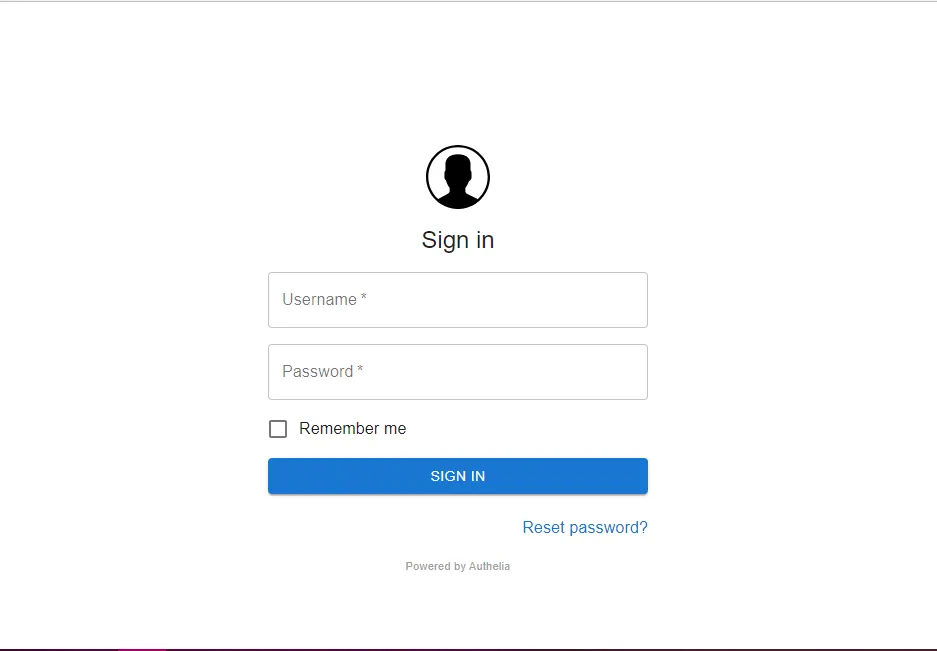
Feel free to leave a comment below if you have any questions or encounter issues setting this up.

Continue reading

How to Self-Host Stalwart Mail Server Using Docker Compose Behind Caddy v2.8.4
Stalwart is an open-source mail server solution with JMAP, IMAP4, POP3 & SMTP support. It is written in Rust and aims to be secure, fast, robust, and scalable.
How to Deploy Elasticsearch 8.8.0 in Docker Swarm Behind Caddy v2.6.4
Elasticsearch is a distributed, RESTful search and analytics engine. Learn how to deploy Elasticsearch and Kibana in a Docker Swarm cluster with persistent storage.

How to Deploy Mattermost in Docker Swarm Behind Caddy v2.4.5
Mattermost is the leading open-source collaboration platform written in Golang and React. Learn how to deploy it in a Docker Swarm cluster using Caddy as a reverse proxy.